Social Media

  • BlueSky
  • Facebook
  • Linkedin
  • Instagram
  • English
  • Français

Login/Register

  • Login
  • Register
Home
  • Licensing
    • CRKN Licensing Principles
    • Model License
    • The Banding System
    • 2026 License Negotiations
      • Stakeholder Alignment Group
    • License Negotiations
    • Directories
    • Publishers and Vendors
    • Tools and Services
      • Foreign Exchange Service
      • Perpetual Access Rights Reports (Serials)
  • Open Access
    • Partnership for Open Access
    • Community Open Access Initiatives
    • Read and Publish Agreements
    • APC Discounts
    • Assessment Guidelines for Open Access Publishers
    • SCOAP³
    • CRKN Open Access Journals List
  • Canadiana
    • About the Canadiana Collections
      • Call for Canadiana Collection Development Projects
      • What’s New in the Collections
      • Navigating the Collections
      • System Status
      • Canadiana Citation Guide
      • Canadiana Infrastructure Updates
      • Canadiana Metadata and Usage Reports
      • Rights Statement Project
      • History of Canadiana
    • Digitization Services
      • Digitization Projects
    • Preservation and Access
      • Trustworthy Digital Repository
    • Digital Heritage Content and Preservation Listserv
    • Acquisition and Use of Commercial Microfilm
    • Future of Canadiana
  • Persistent Identifiers
    • ORCID-CA Consortium
      • How to Join ORCID-CA
      • ORCID-CA Governing Committee
    • DataCite Canada Consortium
      • How to Join DataCite Canada
      • DataCite Canada Governing Committee
    • National PID Strategy
    • Canadian Persistent Identifier Advisory Committee
  • Collaborations
    • Coalition for Canadian Digital Heritage
    • HSS Digital Research Infrastructure in Canada
  • News
    • CRKN Updates
    • Knowledge Exchange
    • Reports
  • Events
    • 2026 CRKN Virtual Conference
    • 2026 CRKN Member Summit and AGM
    • External Events
    • Webinars
    • Code of Conduct
    • Webinar Recordings
  • About
    • Members
      • Associate Membership
    • Board of Directors
    • Committees
      • Executive Committee
      • Finance and Audit Committee
      • Content Strategy Committee
      • Preservation and Access Committee
        • Canadiana Content Sub-Committee
        • Platform Technical Sub-Committee
      • Conference Planning Committee
      • Task Groups
      • CRKN Researcher Council
    • Annual Report
    • Staff
    • Careers
    • History of CRKN
    • Ron MacDonald Service Award
    • Strategic Plan
Menu

From Reels to Reading Online: Digitizing Microfilm at CRKN

Blog

February 26, 2026
Knowledge Exchange blog banner.

By: Francesca Brzezicki, Heritage Engagement Officer

https://doi.org/10.82389/xbh4-d454

At the heart of many digital heritage collections is an unsung hero that deserves some love. The name of that hero? Microfilm!

If you’ve ever browsed a historical newspaper on Canadiana or an archival collection on Héritage, you’ve used digitized microfilm. But what is microfilm, and how does it get from a box on a library shelf to a digital file you can browse online?
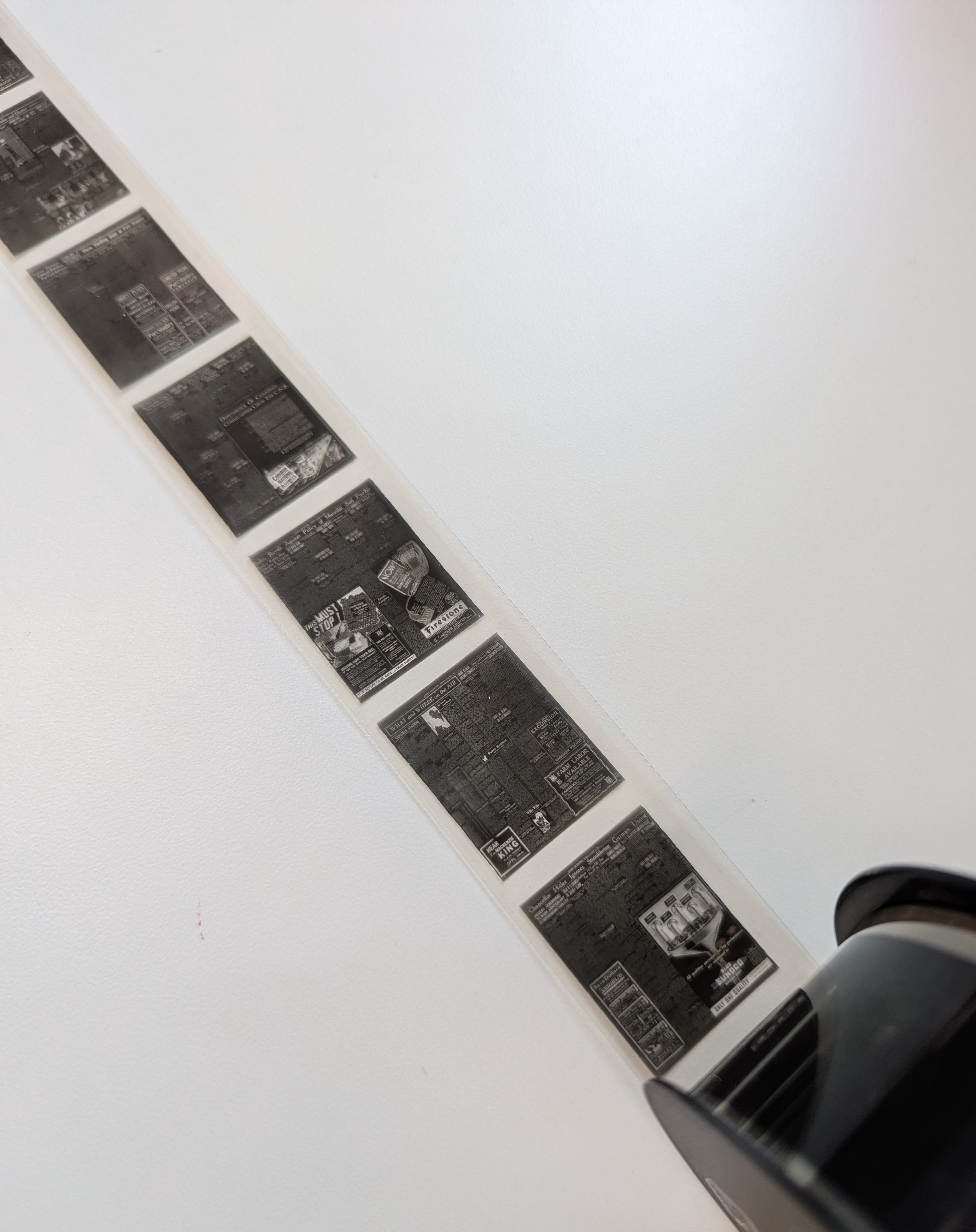
A strip of negative microfilm reel laid out on a table.
Some microfilms are printed as a negative. The image will be reversed as part of the digitization process.

Microfilm 101

Unless you’ve spent time deep in your local library or archives, you might not have encountered microfilm before.

Microfilm is a type of microform: essentially, a tiny photograph of a document that can be projected out to a full-size image. Microfilm consists of a long strip of these photographs developed onto a sheet of transparent film, similar to a miniature reel of movie film. By projecting these images with the help of a microfilm reader, you can read a set of documents in precise detail while preserving the fragile originals (as long as the original documents and microfilm images are high quality).

While the origins of microfilm date back to the origins of photography itself, it wasn’t until the 20th century that the process became popular for duplicating and preserving documents, particularly newspaper collections. Today, microfilm collections are still valuable, as they can last for hundreds of years, don’t take up much space, and sometimes, are the only copies of certain documents that we have left. However, these days it’s more common to use digitized versions of microfilm online than to fire up a microfilm reader in your library’s back room.

Beginning the digitization process at CRKN

CRKN has digitized hundreds of reels of microfilm for the Canadiana Collection, including some of our most popular titles such as the Toronto World, the London Morning Advertiserand London Evening Advertiser, and the Dawn of Tomorrow. So how does this process begin?

First, a set of microfilm reels is delivered to CRKN’s digitization studio in Ottawa from one of our member libraries or digitization clients. When it’s time to start digitizing, one of our Document Scanning Operators loads a reel onto a microfilm scanner and feeds the strip of film over the glass plate of the scanner until the images can be seen. There are two common sizes of microfilm—16mm and 35mm—and our scanners can handle both.
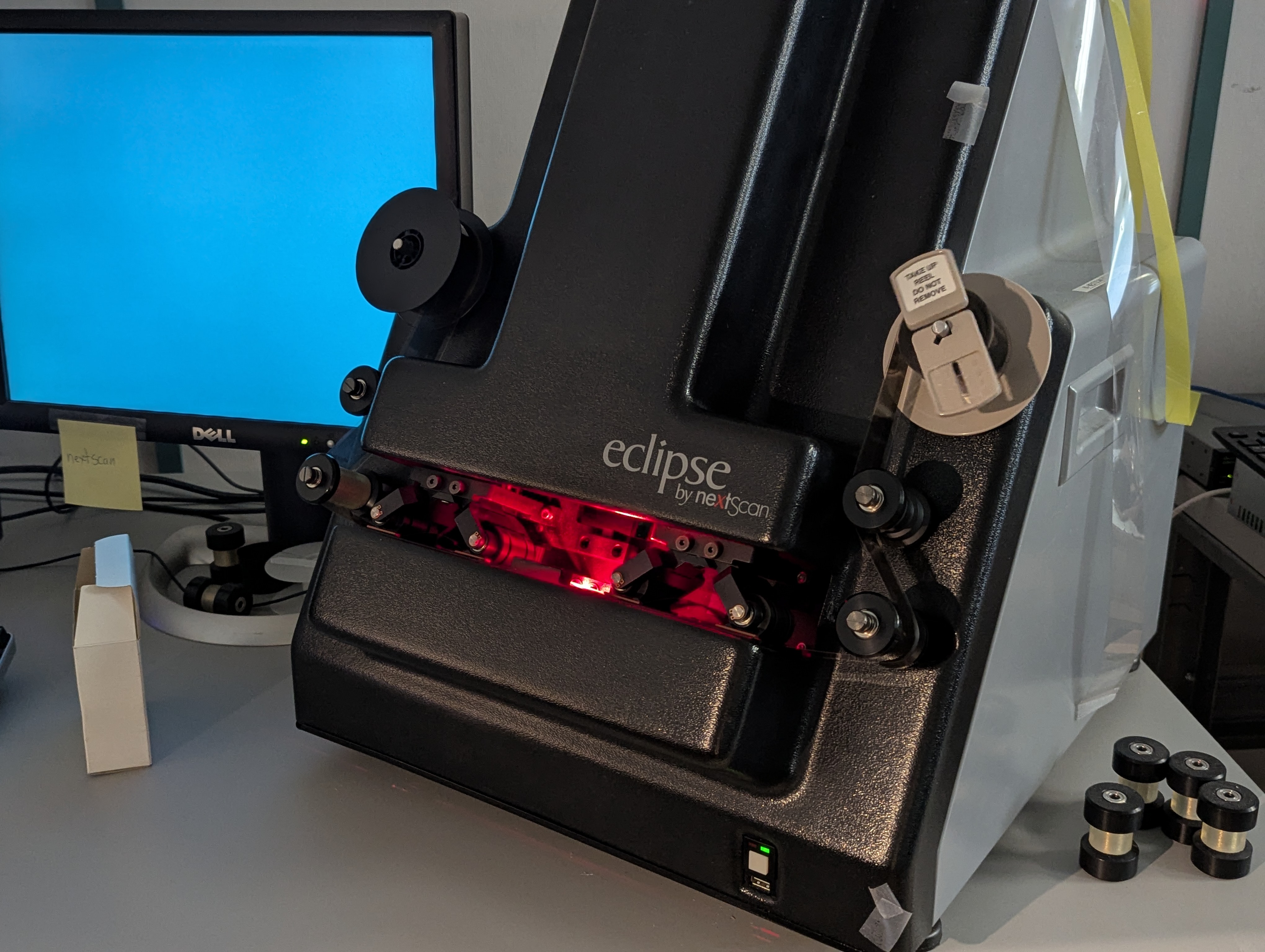
A microfilm scanner and a computer sit on a desk.
A microfilm reel ready to scan. The scanner's lamp is red to minimize reflections on the microfilm.

The scanner is connected to a computer with a program that can be used to adjust the exposure before digitization begins. Microfilm that is too dark can be brightened by turning up the lamp on the scanner, but be careful if you’re digitizing negatives! Turning up the brightness on negative microfilm will only make things darker. 

Once everything is ready, our operators hit the “scan” button, and the digitization starts automatically. A full reel of microfilm takes from ten to fifteen minutes to scan: pretty good time for hundreds or even thousands of images!

Auditing and editing the images

As the scanner digitizes the images, something called a ribbon file is created. The ribbon file is a single, huge file containing all the frames from the microfilm reel stacked back-to-back, which need to be separated into individual images with special auditing software.

Our Digitization Team uses software that detects each frame automatically. However, sometimes adjustments need to be made, especially if a document was microfilmed as a two-page spread: each page within a single frame needs to be separated out. Because of this, separating the images can take anywhere from five minutes to several hours. Edits such as rotating images and fine-tuning borders are also made at this stage.
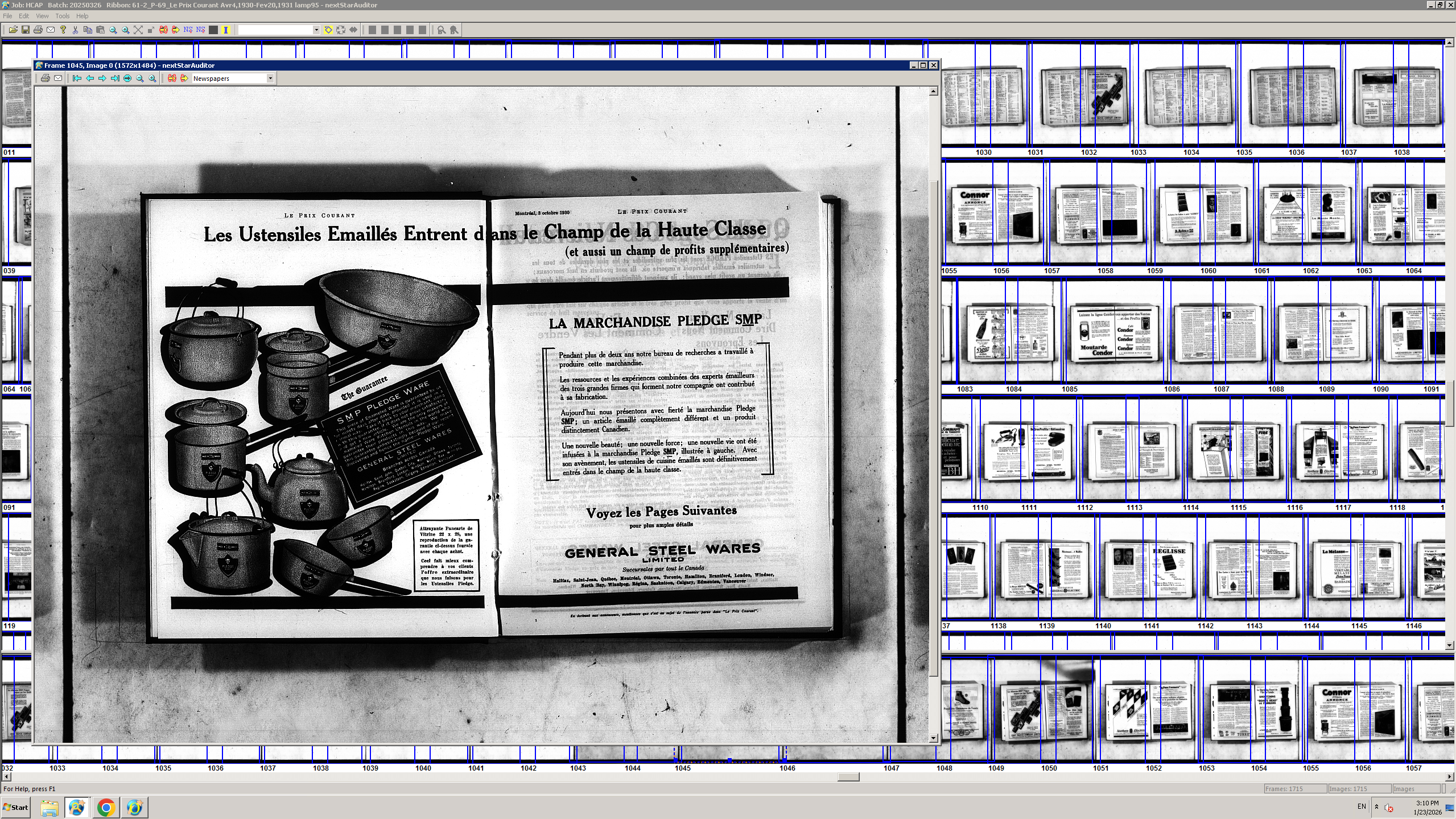
A screenshot of auditing software showing a strip of microfilm frames and a single frame blown up to full size.
An example of two-page spreads from the Canadiana title Le prix courant.

Next, images are bulk edited in LIMB, a program designed for editing mass digitization projects. Conventional photo editing software simply can’t handle the volume of images in microfilm digitization projects, which can contain tens of thousands of images.

When editing, our Document Scanning Operators focus on ensuring that brightness and contrast are high enough for our optical character recognition (OCR) software to detect words and letters in the images for full-text searching. This also translates into better legibility for human readers.

Final steps and quality control

From here, the digitized images are exported onto a dedicated server. Our Document Scanning Operators go through the images one last time to check for any problems or missing files that may have been overlooked.

When the images get the final seal of approval, they are sent to CRKN’s metadata and technical staff for metadata creation, optical character recognition (OCR) processing, and uploading to the Canadiana access platform and the Canadiana Trustworthy Digital Repository (TDR). However, that’s a story for another Knowledge Exchange post!

Why we love digitizing microfilm

Microfilm digitization projects can sometimes be demanding due to their size and variable image quality. However, the amount of information they hold is second-to-none, and it would take weeks longer to digitize the same number of items from physical paper copies. 

“Technically speaking, it’s fun to be able to work on such a huge project with tens of thousands of images. It’s challenging in a really rewarding way,” says Avalon Arsenault, one of CRKN’s Document Scanning Operators who has digitized many of our recent microfilm projects. “And then, I get to go through the material and see the old photographs and catch interesting headlines. I almost get to live in another time for a little bit.”

Microfilm may not be trendy these days—but what’s recorded on these reels of film is a treasure trove of data, stories, and information about the past. That’s why microfilm continues to be an essential part of the Canadiana and Héritage collections.

💻 Connect with CRKN

Do you know of a microfilm collection that would be a great fit for Canadiana? Let us know by contacting our Digitization Team directly at digitization@crkn.ca.

Have you used digitized microfilm collections on Canadiana or Héritage in your research? We love hearing from our user community! Send us your research stories, questions, and comments at info@crkn.ca.

Further Reading

European Space Agency Archives, “A brief history of preservation: microfiche and microfilm,” accessed February 16, 2026, https://historicalarchives.esa.int/brief-history-preservation-microfiche-and-microfilm.

Northeast Document Conservation Center, “6.1 Microfilm and Microfiche,” accessed February 16, 2026, https://www.nedcc.org/free-resources/preservation-leaflets/6.-reformatting/6.1-microfilm-and-microfiche.

Rachel Sudbeck, “Accessibility Issues in the Case of Microfilm (And Why You Should Still Give it a Chance),” University of Illinois Urbana-Champaign: History, Philosophy, and Newspaper Library, January 15, 2025, https://www.library.illinois.edu/hpnl/blog/accessibility-issues-in-the-case-of-microfilm-and-why-you-should-still-give-it-a-chance/.

Tad Bennicoff, “Microfilm Reels in the 21st Century,” Smithsonian Institution Archives Blog, June 20, 2019, https://siarchives.si.edu/blog/microfilm-reels-21st-century.

Francesca Brzezicki headshot.


Francesca Brzezicki https://orcid.org/0009-0005-0744-715X

Francesca Brzezicki joined CRKN in 2019 and holds a Master's degree in Public History from Carleton University. You can contact her at fbrzezicki@crkn.ca.

Related Links

When Writers Fall in Love: Infamous Romantic Era Couples Who Changed Literature
This Valentine’s Day, we’re celebrating love stories that shaped literary history with the help of open access research. We're highlighting two fascinating couples from the Romantic era: Mary Wollstonecraft and William Godwin, and their daughter Mary...
Enhancing IIIF Content Structure with Range Editing
The latest version of the Digirati IIIF Manifest Editor was released in late November, following the completion of a new Range Editor workbench. This release also included a few significant usability enhancements, including a revised interface for...
Science Dimension (1969–1984): Seeking Evidence of Women in STEM
During the Fall 2025 term, Olivia Georgiou, Queen’s University undergraduate student in Political Science and History, joined CRKN staff members Percy Miller, Heritage Services Specialist, and Angela Joosse, Community Engagement Specialist, on a...

Keywords

Blog
crkn footer logo

Canadian Research Knowledge Network

1309 Carling Ave PO Box 35155 Westgate Ottawa, ON K1Z 1A2 t. 613.907.7040

Footer menu

  • Contact Us
  • Newsletter Sign Up
canadiana-footer-logo

CRKN respectfully acknowledges that its offices are located on the traditional, unceded territory of the Algonquin Anishinaabe People. We also recognize that our member institutions are situated across the land now known as Canada, and we extend our respect and gratitude to all First Nations, Métis, and Inuit communities.

Through our work—particularly with the Canadiana and Héritage collections—we are committed to acknowledging colonial injustices, supporting First Nation, Inuit, and Métis data sovereignty, and working in partnership with communities. We strive to engage in respectful practices that honour community protocols and uphold the right of Indigenous Peoples to determine how materials related to their heritage are governed.

Policy Menu

  • Privacy Policy
  • Accessibility Policy
  • Sitemap
© 2013 - 2026 Canadian Research Knowledge Network
  • Licensing
    • CRKN Licensing Principles
    • Model License
    • The Banding System
    • 2026 License Negotiations
      • Stakeholder Alignment Group
    • License Negotiations
    • Directories
    • Publishers and Vendors
    • Tools and Services
      • Foreign Exchange Service
      • Perpetual Access Rights Reports (Serials)
  • Open Access
    • Partnership for Open Access
    • Community Open Access Initiatives
    • Read and Publish Agreements
    • APC Discounts
    • Assessment Guidelines for Open Access Publishers
    • SCOAP³
    • CRKN Open Access Journals List
  • Canadiana
    • About the Canadiana Collections
      • Call for Canadiana Collection Development Projects
      • What’s New in the Collections
      • Navigating the Collections
      • System Status
      • Canadiana Citation Guide
      • Canadiana Infrastructure Updates
      • Canadiana Metadata and Usage Reports
      • Rights Statement Project
      • History of Canadiana
    • Digitization Services
      • Digitization Projects
    • Preservation and Access
      • Trustworthy Digital Repository
    • Digital Heritage Content and Preservation Listserv
    • Acquisition and Use of Commercial Microfilm
    • Future of Canadiana
  • Persistent Identifiers
    • ORCID-CA Consortium
      • How to Join ORCID-CA
      • ORCID-CA Governing Committee
    • DataCite Canada Consortium
      • How to Join DataCite Canada
      • DataCite Canada Governing Committee
    • National PID Strategy
    • Canadian Persistent Identifier Advisory Committee
  • Collaborations
    • Coalition for Canadian Digital Heritage
    • HSS Digital Research Infrastructure in Canada
  • News
    • CRKN Updates
    • Knowledge Exchange
    • Reports
  • Events
    • 2026 CRKN Virtual Conference
    • 2026 CRKN Member Summit and AGM
    • External Events
    • Webinars
    • Code of Conduct
    • Webinar Recordings
  • About
    • Members
      • Associate Membership
    • Board of Directors
    • Committees
      • Executive Committee
      • Finance and Audit Committee
      • Content Strategy Committee
        • Knowledge Base Entitlements Sub-Committee
      • Preservation and Access Committee
        • Canadiana Content Sub-Committee
        • Platform Technical Sub-Committee
      • Conference Planning Committee
      • Task Groups
      • CRKN Researcher Council
    • Annual Report
    • Staff
    • Careers
    • History of CRKN
    • Ron MacDonald Service Award
    • Strategic Plan